
Opened a New Office, Warehouse, Shop, or Branch? Don’t Forget to Update It on Your GST Registration. Expanding your business is always exciting. Whether you’ve opened a new retail store, started operating from a warehouse, added a branch office, leased a godown, or established a new manufacturing unit, every new business location represents growth.
However, many business owners overlook one critical compliance requirement—updating the Additional Place of Business in their GST registration.
This small oversight can create significant compliance issues. If your business is operating from an unregistered location, you may face difficulties during GST audits, departmental inspections, e-way bill verification, or while claiming Input Tax Credit (ITC). In some cases, incorrect business location details can even lead to notices from GST authorities.
Fortunately, the GST Portal allows registered taxpayers to add an Additional Place of Business through an online amendment process. Since this change is treated as a Core Field Amendment, the application must be approved by the GST officer before it becomes effective.
In this comprehensive guide, you’ll learn how to Add an Additional Place of Business on the GST Portal.
What Is an Additional Place of Business Under GST?
An Additional Place of Business (APOB) is any business location, apart from the Principal Place of Business, from where a registered taxpayer carries out business activities.
It can include any premises used for:
- Selling goods
- Providing services
- Manufacturing products
- Warehousing or storage
- Distribution activities
- Branch office operations
- Administrative work
- Stock transfers
- Customer support centers
Every business location that conducts taxable business activities should be properly disclosed in your GST registration.
For example, if your company has:
- A head office in Bengaluru
- A warehouse in Mysuru
- A retail showroom in Hubballi
the warehouse and showroom should generally be added as Additional Places of Business under the same GST registration, provided they are within the same State or Union Territory.
Principal Place of Business vs Additional Place of Business on the GST Portal
Many taxpayers confuse these two terms. Understanding the difference helps avoid registration mistakes.
| Principal Place of Business on the GST Portal | Additional Place of Business on the GST Portal |
| Main business location | Any other registered business location |
| Primary books of accounts are generally maintained here | Used for business operations in addition to the principal place |
| Declared during initial GST registration | Added later through GST amendment or declared during registration |
| One principal place only | Multiple additional places allowed |
Simply put, the Principal Place of Business is your primary business address, while every other operational location is treated as an Additional Place of Business.
Why Is It Important to Add an Additional Place of Business on the GST Portal?
Adding a new business location to your GST registration is more than a procedural requirement. It ensures that your business remains compliant with GST laws while maintaining transparency with tax authorities.
Maintains GST Compliance
GST law requires taxpayers to maintain accurate registration details. Whenever a new business location becomes operational, updating your registration helps ensure compliance.
Avoids Future GST Notices
Operating from an unregistered business location may invite questions during GST inspections or departmental verification.
Keeping your registration updated reduces the likelihood of unnecessary notices.
Supports Smooth Business Operations
Businesses often require proof of GST registration when:
- Opening warehouses
- Applying for trade licenses
- Obtaining local registrations
- Working with large corporate customers
- Participating in government tenders
Updated GST registration helps complete these processes smoothly.
Improves Business Credibility
Accurate registration information enhances credibility with:
- Customers
- Vendors
- Banks
- Government departments
- Financial institutions
Ensures Proper Record Keeping
Maintaining updated business location information simplifies:
- GST audits
- Department inspections
- Compliance reviews
- Internal record management
When Is It Mandatory to Add an Additional Place of Business?
Businesses should update their GST registration whenever they begin operating from a new location within the same State or Union Territory.
Common situations where you need to add an Additional Place of Business on the GST Portal include:
Opening a New Branch Office
Expanding into another city within the same State generally requires adding the branch as an Additional Place of Business.
Starting a Warehouse or Godown
Storage facilities used for keeping taxable goods should generally be disclosed.
Opening a Retail Outlet
Every new showroom or retail store operating under the same GST registration should be added.
Adding a Manufacturing Unit
Manufacturing units located within the same GST registration jurisdiction should also be reflected.
Starting a Service Office
Consulting firms, IT companies, marketing agencies, and service providers often expand by opening additional offices.
Such locations should be updated accordingly.
Who Can Add an Additional Place of Business?
The amendment can generally be filed by:
- Proprietors
- Partners
- Directors
- LLP Designated Partners
- Authorized Signatories
- GST Practitioners (where authorized)
However, the application must ultimately be verified by the Authorized Signatory using the prescribed verification method.
Documents Required to Add an Additional Place of Business on the GST Portal
Before starting the amendment process, keep the necessary documents ready.
Depending on the nature of the premises, you may require:
Address Proof
Such as:
- Electricity Bill
- Property Tax Receipt
- Municipal Records
- Water Bill
Ownership Proof
If the property is owned:
- Property documents
- Sale deed
- Municipal records
Rent or Lease Agreement
If the premises are rented or leased, keep the rent agreement or lease deed ready.
No Objection Certificate (NOC)
Where applicable, an NOC from the property owner may be required.
Business Details
Ensure you have:
- Complete address
- PIN Code
- Landmark
- District
- Nature of business activities
Things to Know Before Adding an Additional Place of Business on the GST Portal
Before starting the process to add an Additional Place of Business on the GST Portal, keep these important points in mind.
It Is a Core Field Amendment
Unlike updating a mobile number, email ID, or bank account details on the GST portal, adding an Additional Place of Business is classified as a Core Field Amendment.
This means GST officer approval is required.
Approval Is Not Instant
The amendment becomes effective only after approval by the jurisdictional GST officer.
Accurate Address Is Essential
Incorrect address details may delay approval or lead to rejection.
Always verify:
- Building number
- Street
- Locality
- PIN Code
- District
before submission.
Supporting Documents Must Match
The address mentioned in supporting documents should exactly match the address entered in the amendment application.
Any mismatch can delay processing.
How to Add an Additional Place of Business on the GST Portal
Once you have the required documents and address details ready, you can add an Additional Place of Business through the GST Portal. Since this is a Core Field Amendment, the application must be approved by the jurisdictional GST officer before the changes become effective.
Follow the step-by-step process to add an Additional Place of Business on the GST Portal as given below.
Step 1: Log in to the GST Portal
Visit the official GST Portal and log in using your registered Username and Password.
After successful login, you will be redirected to the GST dashboard, where you can access various GST registration services.
Step 2: Navigate to the Registration Amendment Section
From the GST dashboard, navigate to:
Services → Registration → Amendment of Registration Core Fields
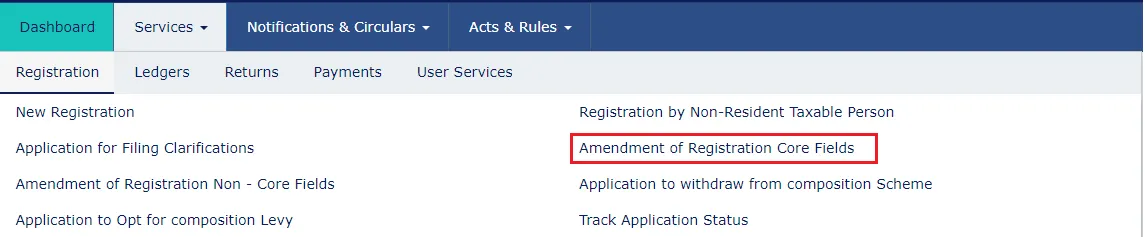
Since adding an Additional Place of Business is considered a Core Field Amendment, all changes must be made through this section.
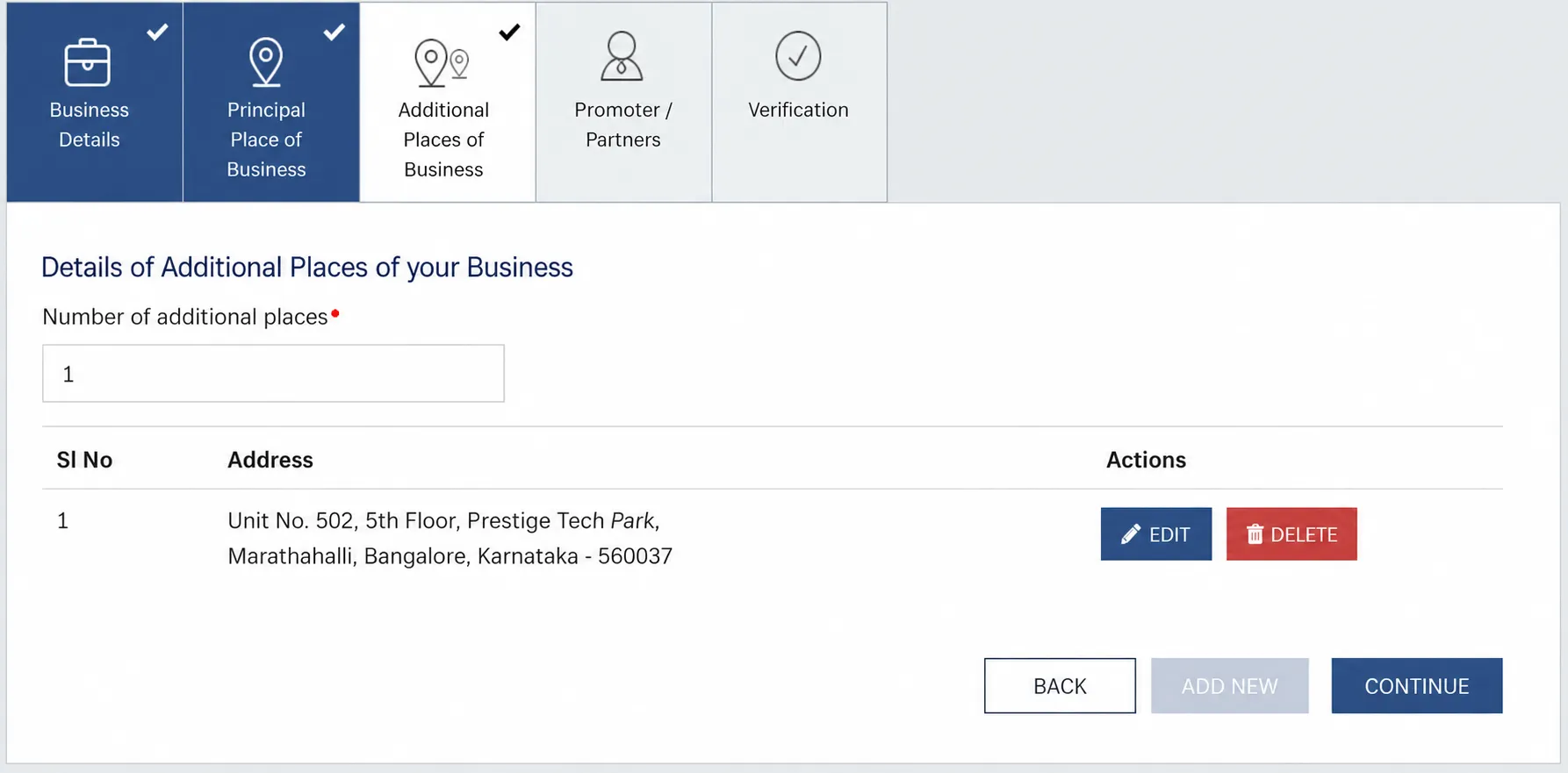
Step 3: Open the “Additional Place of Business” Tab
Various tabs related to GST registration amendments will be displayed on the screen.
Click on the “Additional Place of Business” tab to view the existing additional business locations or add a new one.
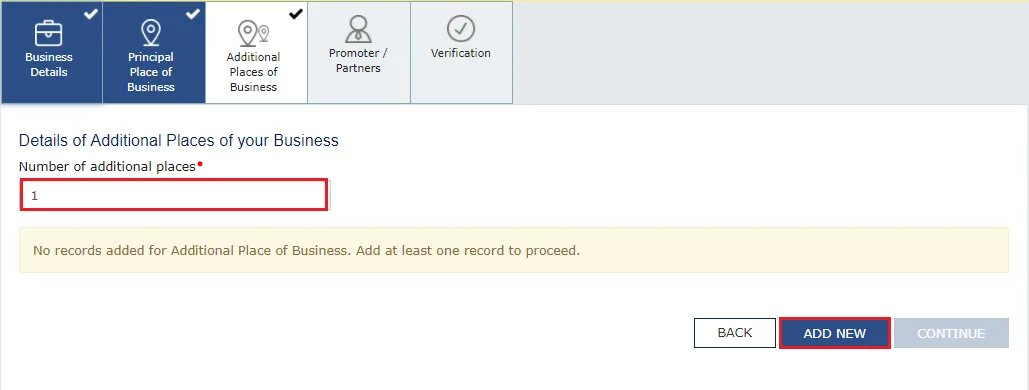
Note: If your GST registration does not have any Additional Place of Business yet, first go to the “Principal Place of Business” tab and select “Yes” against the option “Have Additional Place of Business”. After enabling this option, return to the Additional Place of Business tab to continue. You can also edit the address of an existing Additional Place of Business from this section.
Step 4: Click “Add New” and Enter Business Details
Click on the “Add New” button.
Enter all the required details of the new business location, including the complete address.
You must also provide:
- Reason for Amendment
- Date of Amendment
After entering all the information, click “Save”.
Step 5: Search and Select the Business Location
The GST Portal allows you to locate the business address using:
- Address
- PIN Code
- Latitude and Longitude
You can enter coordinates using a comma (,) between the values.
For example:
- 22.48, 77.89
- 22,7
You may also enter alphanumeric address details in the search box.
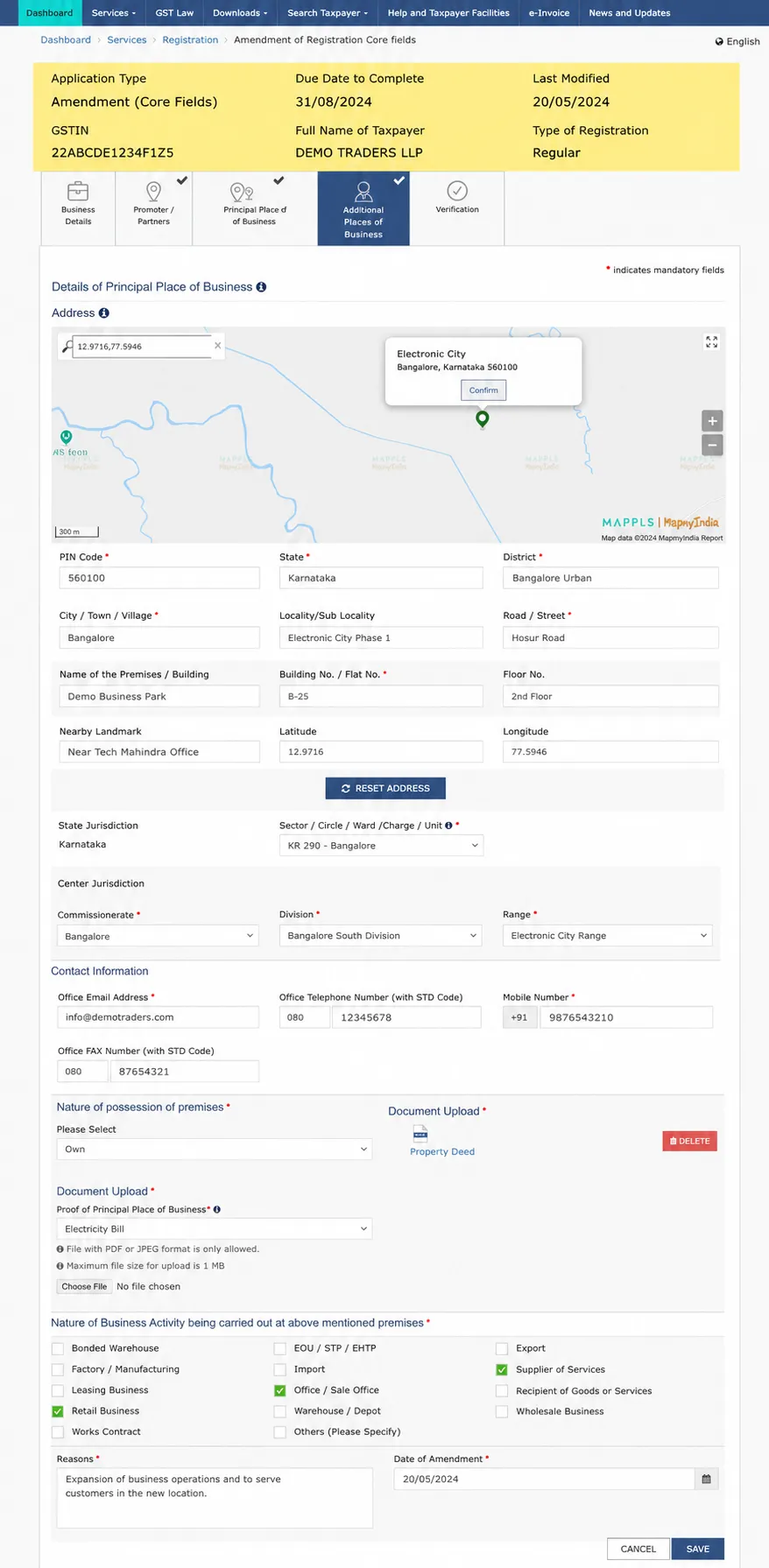
After entering at least two characters, the GST Portal automatically displays address suggestions in the “Enter Address or Latitude, Longitude” search box located on the right side of the map.
Select the appropriate location or manually enter the address if required.
Step 6: Complete the Verification Process
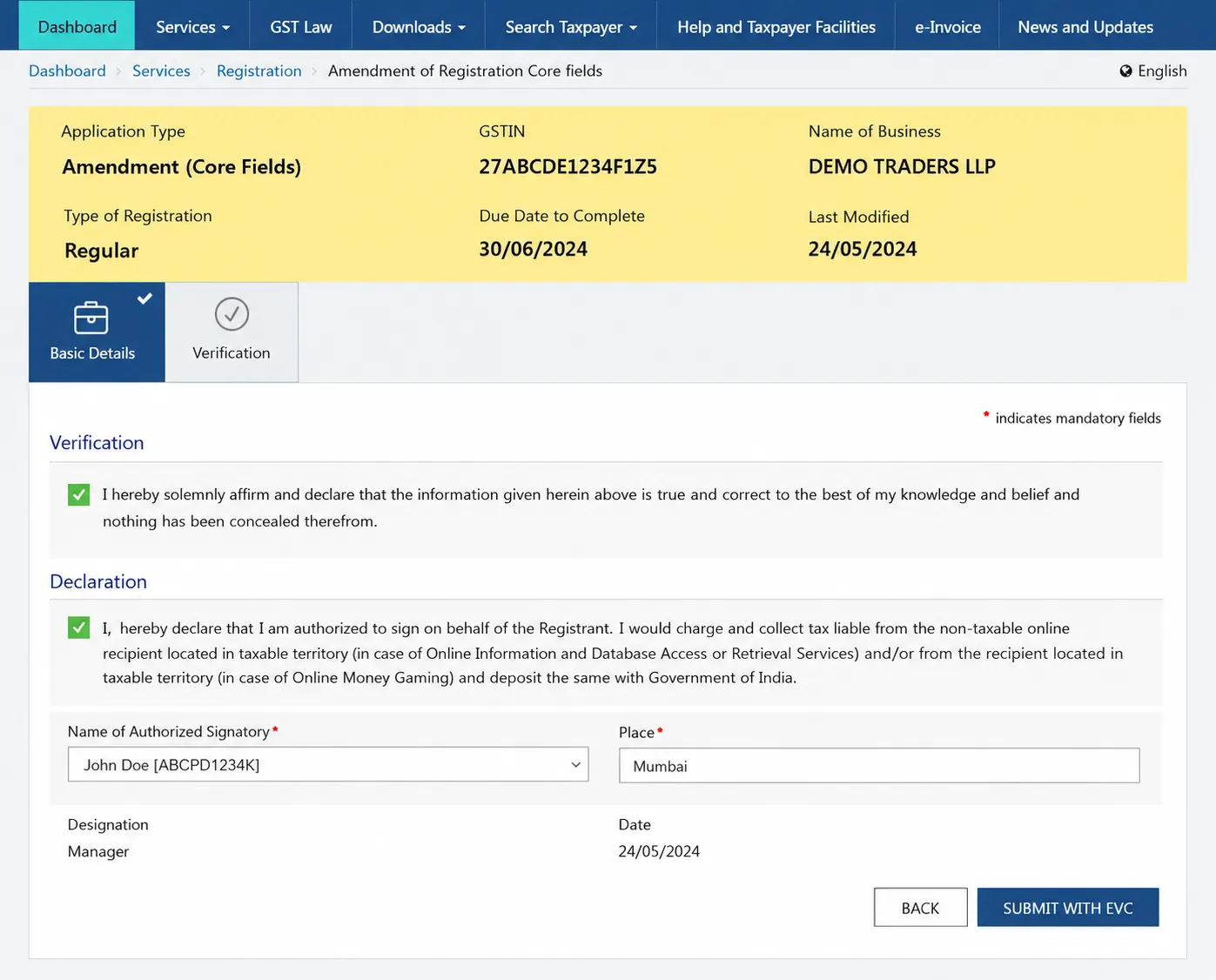
After saving the business details, click on the “Verification” tab.
Now complete the following:
- Select the verification checkbox.
- Choose the Authorised Signatory from the drop-down list.
- Enter the Place of submission.
- Select the preferred method to digitally sign the application using either:
- Digital Signature Certificate (DSC), or
- Electronic Verification Code (EVC).
Carefully verify all the information before proceeding.
Step 7: Submit the Amendment Application
Once the verification is complete, submit the application.
After successful submission, the GST Portal will display a confirmation message stating “Successful Submission.”
An Application Reference Number (ARN) will be generated, and an acknowledgement will be sent to your registered mobile number and email address within approximately 15 minutes.
Keep the ARN safely, as it can be used to track the amendment status.
Step 8: Wait for GST Officer Approval
Since adding an Additional Place of Business is a Core Field Amendment, the application is forwarded to the jurisdictional GST officer for verification and approval.
After reviewing the application, the GST officer may:
- Approve the amendment,
- Request additional clarification or documents, or
- Reject the application if discrepancies are found.
The final status of the application will be communicated through SMS and email sent to your registered mobile number and email address.
Once approved, the Additional Place of Business will be added to your GST registration, and the updated GST Registration Certificate can be downloaded from the GST Portal.
What Happens After You Submit the Amendment Application?
After successfully submitting the application to add an Additional Place of Business, many taxpayers assume the process is complete. However, since this amendment relates to a Core Field of your GST registration, there are a few more stages before the new business location becomes officially registered.
Understanding what happens after submission will help you monitor your application and avoid unnecessary confusion.
Application Reference Number (ARN) Is Generated
Immediately after the application is submitted successfully, the GST Portal generates an Application Reference Number (ARN).
The ARN acts as a unique tracking number for your amendment request.
It serves several important purposes, including:
- Tracking the amendment status
- Confirming successful application submission
- Communicating with GST authorities regarding the amendment
- Referring to the application during future correspondence
It is advisable to save the ARN by taking a screenshot or noting it down for future reference.
Acknowledgement Sent by GST Portal
Within approximately 15 minutes of submitting the application, the GST Portal sends an acknowledgement to the taxpayer through:
- Registered Mobile Number
- Registered Email Address
This acknowledgement confirms that the amendment application has been successfully received by the GST system.
Receiving the acknowledgement does not mean the amendment has been approved. It simply confirms that the application has been submitted successfully.
GST Officer Verification
Since adding an Additional Place of Business is a Core Field Amendment, the application is forwarded to the jurisdictional GST officer for review.
The officer verifies:
- Business address details
- Supporting documents
- Nature of business activities
- Ownership or possession of the premises
- Compliance history, if required
The officer may also examine whether the new location is consistent with the business activities declared under GST registration.
Possible Outcomes of the Amendment Application
After reviewing the application, the GST officer may take one of the following actions.
Application Approved
If all the information and supporting documents are accurate, the GST officer approves the amendment.
Once approved:
- The Additional Place of Business is added to your GST registration.
- The updated details become part of your GST records.
- The revised GST Registration Certificate can be downloaded from the GST Portal.
Clarification Requested
If the GST officer requires additional information or notices discrepancies in the application, a clarification request may be issued.
Common reasons include:
- Incomplete address details
- Unclear supporting documents
- Address mismatch
- Missing ownership proof
- Incorrect business activity information
Taxpayers should respond promptly with the required information to avoid delays.
Application Rejected
If significant discrepancies remain unresolved or the required documents are not submitted, the GST officer may reject the amendment request.
In such cases, the taxpayer may need to submit a fresh amendment application after correcting the identified issues.
How to Track the Status of Your Amendment Application
Instead of waiting for emails or SMS updates, taxpayers can monitor the amendment status directly through the GST Portal.
To check the current status of your amendment application, follow the steps below to check your GST status:
Step 1: Login to the GST Portal
Access your GST account using your credentials.
Step 2: Navigate to Track Application Status
Go to:
Services → Registration → Track Application Status
Step 3: Enter the ARN
Provide the Application Reference Number generated after submission.
Step 4: View the Status
The GST Portal will display the latest status of your amendment application.
Common status messages include:
- Pending for Processing
- Under Verification
- Clarification Required
- Approved
- Rejected
Checking the status periodically helps taxpayers stay informed about the progress of their application.
Can You Edit an Existing Additional Place of Business?
Yes.
The GST Portal allows registered taxpayers to modify details of an existing Additional Place of Business whenever necessary.
You may need to edit an existing business location if:
- The address changes.
- The building number changes.
- The business shifts within the same State.
- Contact details require updating.
- Business activities carried out from that location change.
The amendment process is similar to adding a new Additional Place of Business and must be submitted through the Amendment of Registration Core Fields section.
Since these are also Core Field amendments, GST officer approval is generally required.
Can You Remove an Additional Place of Business?
Yes.
If a branch office, warehouse, showroom, or business unit is permanently closed or no longer used for business activities, taxpayers should update their GST registration accordingly.
Removing inactive business locations helps maintain accurate GST records and prevents unnecessary compliance issues.
The removal process also requires a Core Field amendment and approval from the GST department.
Common Mistakes to Avoid While Adding an Additional Place of Business
Although the amendment process is straightforward, many applications are delayed or rejected due to avoidable mistakes.
Here are some of the most common errors.
Entering an Incorrect Address
The business address entered on the GST Portal should exactly match the supporting documents.
Even small spelling differences may lead to queries from the GST officer.
Uploading Incorrect Address Proof
Many taxpayers upload documents that:
- Are outdated
- Do not match the entered address
- Are blurred or unreadable
- Are incomplete
Always upload clear and valid supporting documents.
Selecting the Wrong Nature of Possession
Choose the correct type of possession, such as:
- Owned
- Rented
- Leased
- Shared
- Consent Arrangement
Incorrect selection may delay approval.
Providing Incorrect PIN Code
The PIN code should correspond to the actual location of the premises.
An incorrect PIN code may create jurisdiction issues.
Not Mentioning the Correct Reason for Amendment
Always provide a clear and accurate reason for adding the Additional Place of Business.
Examples include:
- Opening a new warehouse
- Starting a branch office
- Expanding retail operations
- Adding a manufacturing unit
Submitting Without Reviewing the Application
Before clicking Submit, carefully verify:
- Address
- Building Number
- PIN Code
- District
- Supporting Documents
- Business Activity
A few extra minutes spent reviewing the application can prevent unnecessary delays.
Geocoding Rules for Additional Place of Business
Many taxpayers wonder whether geocoding is required for every business location.
Currently, Geocoding of Address applies only to the Principal Place of Business.
It does not apply to Additional Places of Business.
However, taxpayers can still use the map and address search feature available on the GST Portal to identify and enter the correct address.
Can You Manually Enter the Address Instead of Selecting It on the Map?
Yes.
The GST Portal allows taxpayers to manually enter the complete address instead of selecting it through the map interface.
The State is automatically picked based on the GST registration and cannot be changed while adding or amending an Additional Place of Business.
Can You Change the State While Adding an Additional Place of Business?
No.
You cannot change the State or State Code while amending either the Principal Place of Business or an Additional Place of Business.
If your business expands into another State or Union Territory, you must obtain a separate GST registration for that State, as GST registrations are State-specific.
Best Practices Before Submitting the Application
To ensure faster approval and avoid rejection, consider the following best practices:
- Verify the complete business address before submission.
- Keep ownership or rental documents ready.
- Upload clear and readable supporting documents.
- Ensure the address matches all supporting records.
- Mention the correct reason for amendment.
- Save the ARN immediately after submission.
- Regularly track the amendment status on the GST Portal.
- Respond promptly if clarification is requested by the GST officer.
Following these practices can significantly improve the chances of a smooth and timely approval process.
Conclusion
We have covered a detailed guide on how to add an Additional Place of Business on the GST Portal. Adding an Additional Place of Business to your GST registration is an important compliance requirement whenever your business expands to a new office, warehouse, retail outlet, branch, or manufacturing unit within the same State or Union Territory. Since it is treated as a Core Field Amendment, the request must be submitted through the GST Portal and approved by the jurisdictional GST officer before it becomes effective.
By keeping your GST registration updated with accurate business location details, you not only remain compliant with GST regulations but also avoid unnecessary notices, improve operational transparency, and ensure smooth business operations. Taking a few minutes to update your GST registration today can save your business from compliance issues in the future.
Need Help Updating Your GST Registration?
Whether you’re adding an Additional Place of Business, changing your Principal Place of Business, updating partner details, or making any other GST registration amendment, TrueTax Consultant is here to help.
Our experienced GST professionals provide end-to-end assistance with:
- GST Registration
- GST Registration Amendments
- Additional Place of Business Updates
- Principal Place of Business Changes
- GST Return Filing
- GST Notice Handling
- GST Compliance Advisory
- GST Cancellation & Revocation
Focus on growing your business while TrueTax Consultant takes care of your GST compliance. Contact TrueTax Consultants Bangalore or call +91 98452 72393 our experts today for fast, accurate, and hassle-free GST services.
FAQs
Is adding an Additional Place of Business mandatory under GST?
Yes. If your business starts operating from a new office, warehouse, branch, showroom, factory, or any other location within the same State or Union Territory, you should update it in your GST registration. Maintaining accurate business location details helps ensure GST compliance and reduces the risk of issues during inspections, audits, or departmental verification.
What documents are required to add an Additional Place of Business on the GST Portal?
The required documents generally include valid address proof such as an electricity bill, municipal tax receipt, or property tax receipt. If the premises are rented or leased, you may also need a rent agreement, lease deed, or a No Objection Certificate (NOC) from the property owner, depending on the nature of possession.
Can I add multiple Additional Places of Business under one GST registration?
Yes. A registered taxpayer can add multiple Additional Places of Business under the same GSTIN, provided all business locations are situated within the same State or Union Territory. Every additional business location should be declared through the GST registration amendment process.
Can I edit or remove an Additional Place of Business on the GST Portal after adding it?
Yes. The GST Portal allows taxpayers to edit or remove an existing Additional Place of Business whenever required. Since these changes affect core registration details, the amendment must be submitted through the Core Fields Amendment section and approved by the jurisdictional GST officer.
How can I track the status of my Additional Place of Business amendment application?
After submitting the amendment request, the GST Portal generates an Application Reference Number (ARN). You can track the application status by navigating to Services → Registration → Track Application Status, entering the ARN, and viewing the latest progress of your application.
How long does it take for the GST department to approve an Additional Place of Business?
The approval timeline depends on the verification carried out by the jurisdictional GST officer. Once the application and supporting documents are reviewed and found satisfactory, the amendment is approved, and the new business location is added to your GST registration.
Will Geocoding of Address apply to all business addresses added to a taxpayer’s GST profile?
No. Geocoding of Address currently applies only to the Principal Place of Business. It does not apply to Additional Places of Business. However, taxpayers can still use the map search feature while entering address details for better location accuracy.
Can the address be entered manually instead of selecting it on the map?
Yes. The GST Portal allows taxpayers to manually enter the complete business address instead of selecting it through the map interface. The State is automatically populated based on the GST registration and cannot be modified while adding or amending an Additional Place of Business.
Can I change the State while amending an Additional Place of Business on the GST Portal?
No. You cannot change the State or State Code while amending either the Principal Place of Business or an Additional Place of Business. If your business expands into another State or Union Territory, you must obtain a separate GST registration for that State.
Is an Additional Place of Business a core or non-core field in GST registration?
An Additional Place of Business is classified as a Core Field under GST registration. Any addition, modification, or removal of an Additional Place of Business must be carried out through the Amendment of Registration Core Fields section and requires approval from the jurisdictional GST officer before the amendment becomes effective.